> ## Documentation Index
> Fetch the complete documentation index at: https://docs.openfuturecoalition.org/llms.txt
> Use this file to discover all available pages before exploring further.
# Welcome
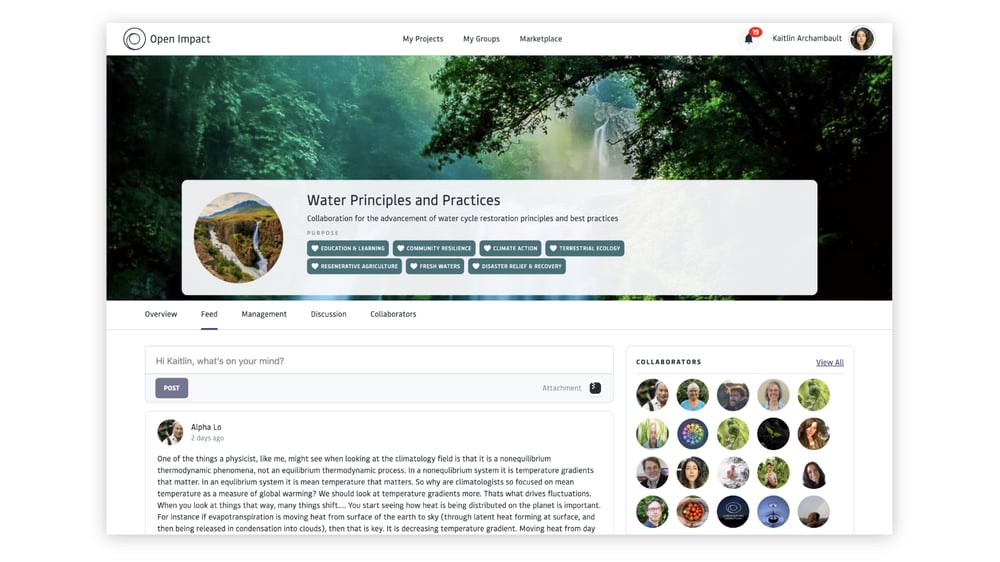
 Open Impact is a shared platform for coordinating complex, real-world initiatives—bringing together projects, data, and collaboration across teams, organizations, and regions.
It supports work as it happens: from coordinating multi-site efforts and capturing field-level insights, to sharing knowledge, tracking outcomes, and making impact visible across an ecosystem of peers, partners, and funders.
These guides support Open Impact users and managers in navigating and setting up vibrant collaborative spaces.
# Choose Your Path
To get started, please select the category that best describes your role:
## **I am a Member**
If you are joining the platform to collaborate with others, start here. You will learn how to join the platform and set up your profile, and effectively navigate through your groups and projects.
* [Joining the Platform →](/joining) *Set up your profile and learn the basics*
* [Navigating the Platform →](/navigating-the-platform) *Navigate Groups, Projects, and other platform areas*
* Platform Fundamentals → *Interact with platform elements*
* [Feed](/platform-fundamentals/feed)
* [Files](/platform-fundamentals/files)
* [Discussions](/platform-fundamentals/discussions)
* [Resources & Resource Library](/platform-fundamentals/resource-library)
* [Calendar](/platform-fundamentals/calendar)
* [Tasks](/platform-fundamentals/tasks)
## **I am a Manager**
If you are responsible for setting up and overseeing work, these guides cover managing organizations, creating Groups and Projects, and configuring Roles & Permissions.
* [Group Management →](/platform-management/groups)
* [Creating a Project →](/platform-management/projects)
* [Project Management →](/platform-management/project-management)
* [Resource Publishing →](/platform-management/resource-publishing)
* [Dashboard Publishing →](/platform-management/dashboard_publishing)
* [Form Publishing →](/platform-management/form-publishing)
* [Event Publishing →](/platform-management/event-publishing)
* [Roles & Permissions →](/platform-management/roles-and-permissions)
* [Privacy & Visibility →](/platform-management/privacy-and-visibility)
# Get Support
Visit our FAQ or contact us.
Get answers to FAQ's
Get in touch with us
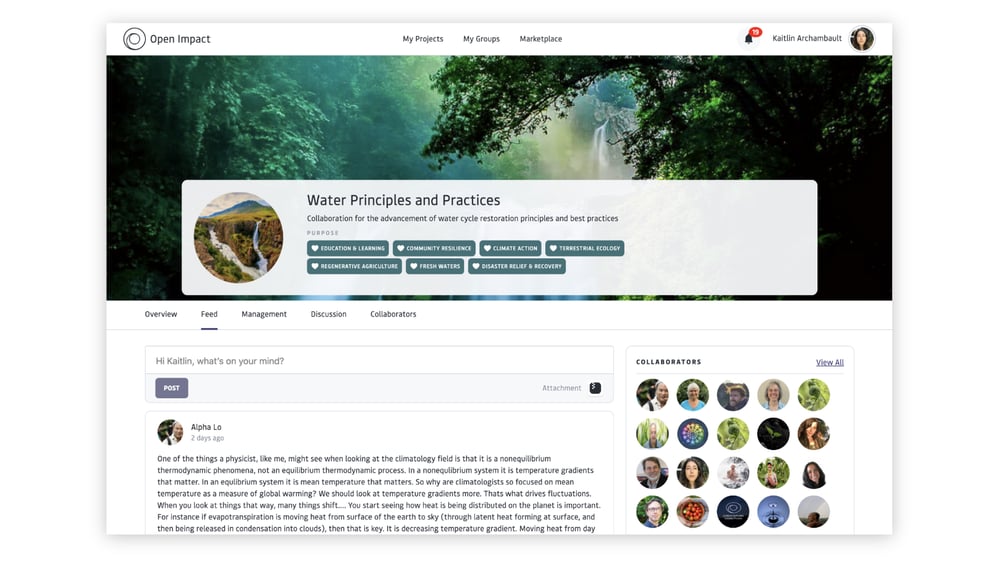
Open Impact is a shared platform for coordinating complex, real-world initiatives—bringing together projects, data, and collaboration across teams, organizations, and regions.
It supports work as it happens: from coordinating multi-site efforts and capturing field-level insights, to sharing knowledge, tracking outcomes, and making impact visible across an ecosystem of peers, partners, and funders.
These guides support Open Impact users and managers in navigating and setting up vibrant collaborative spaces.
# Choose Your Path
To get started, please select the category that best describes your role:
## **I am a Member**
If you are joining the platform to collaborate with others, start here. You will learn how to join the platform and set up your profile, and effectively navigate through your groups and projects.
* [Joining the Platform →](/joining) *Set up your profile and learn the basics*
* [Navigating the Platform →](/navigating-the-platform) *Navigate Groups, Projects, and other platform areas*
* Platform Fundamentals → *Interact with platform elements*
* [Feed](/platform-fundamentals/feed)
* [Files](/platform-fundamentals/files)
* [Discussions](/platform-fundamentals/discussions)
* [Resources & Resource Library](/platform-fundamentals/resource-library)
* [Calendar](/platform-fundamentals/calendar)
* [Tasks](/platform-fundamentals/tasks)
## **I am a Manager**
If you are responsible for setting up and overseeing work, these guides cover managing organizations, creating Groups and Projects, and configuring Roles & Permissions.
* [Group Management →](/platform-management/groups)
* [Creating a Project →](/platform-management/projects)
* [Project Management →](/platform-management/project-management)
* [Resource Publishing →](/platform-management/resource-publishing)
* [Dashboard Publishing →](/platform-management/dashboard_publishing)
* [Form Publishing →](/platform-management/form-publishing)
* [Event Publishing →](/platform-management/event-publishing)
* [Roles & Permissions →](/platform-management/roles-and-permissions)
* [Privacy & Visibility →](/platform-management/privacy-and-visibility)
# Get Support
Visit our FAQ or contact us.
Get answers to FAQ's
Get in touch with us